
If you have been looking for a way to monetize your blog, social media, or even a simple link without needing thousands of visitors, the CPAGrip Content Locker is one of the most practical tools available to Nigerian publishers. This guide walks you through exactly how to set it up and start earning.
If you are new to CPAGrip entirely, read our beginner’s guide first: How CPAGrip Works for Nigerians
What is a Content Locker?
A content locker is a tool that restricts access to something valuable, a free guide, a resource, a download, or exclusive information until a visitor completes a simple action like filling out a form, taking a survey, or downloading an app.
You earn a commission every time someone completes that action. No purchase required from the visitor, which makes conversion much easier than traditional affiliate marketing.
Why Content Lockers Work Well in Nigeria
Nigerians are highly motivated to access free resources, especially anything related to making money, getting opportunities, or accessing tools that cost money elsewhere. A well-placed content locker offering something genuinely valuable converts very well with Nigerian traffic.
Step by Step: Setting Up Your CPAGrip Content Locker
Step 1 — Log Into Your CPAGrip Account
Go to cpagrip.com and log in with your publisher credentials. If you don’t have an account yet, [sign up here as a publisher.]
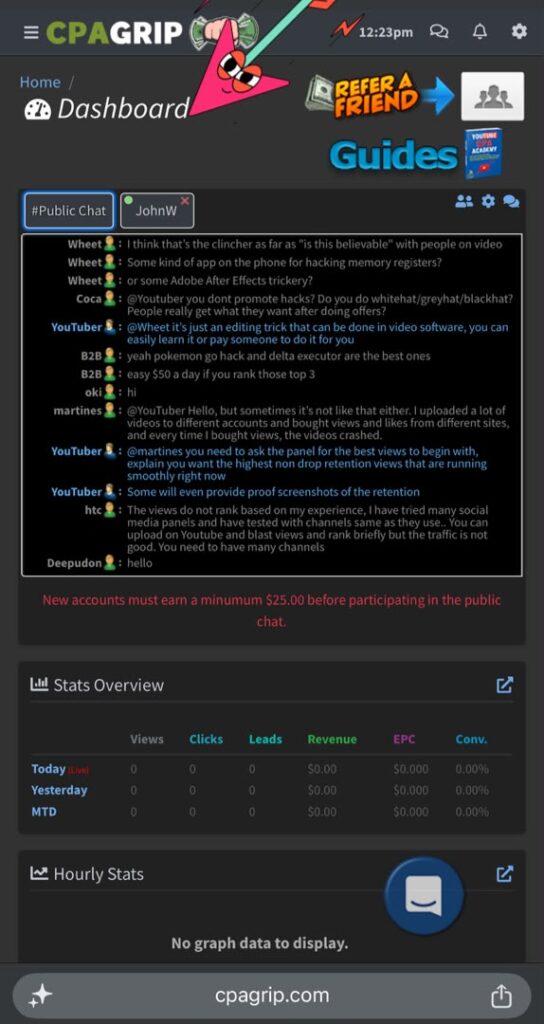
Step 2 — Go to Monetization Tools
Click the menu icon at the top left of your dashboard. Look for “Monetization Tools” in the dropdown menu and click on it.
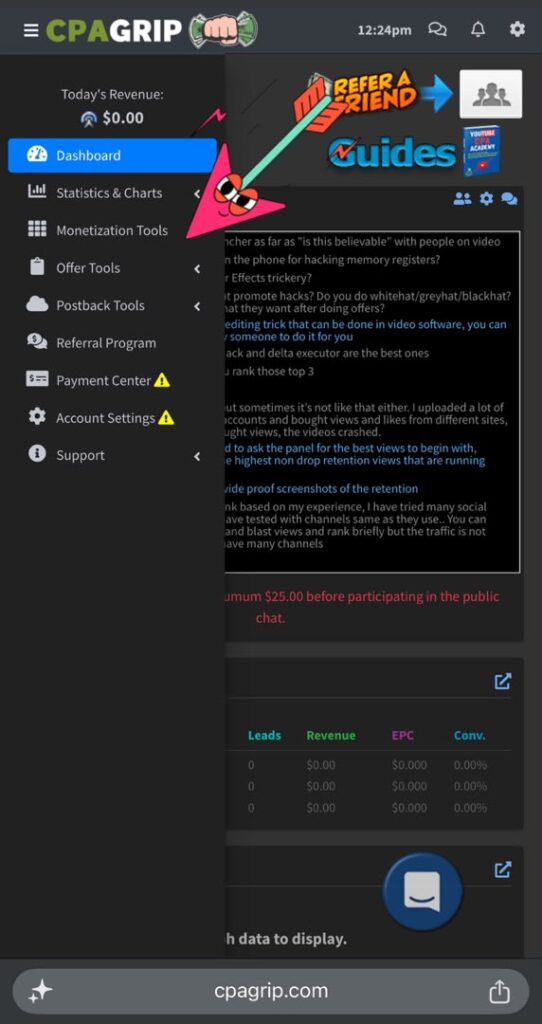
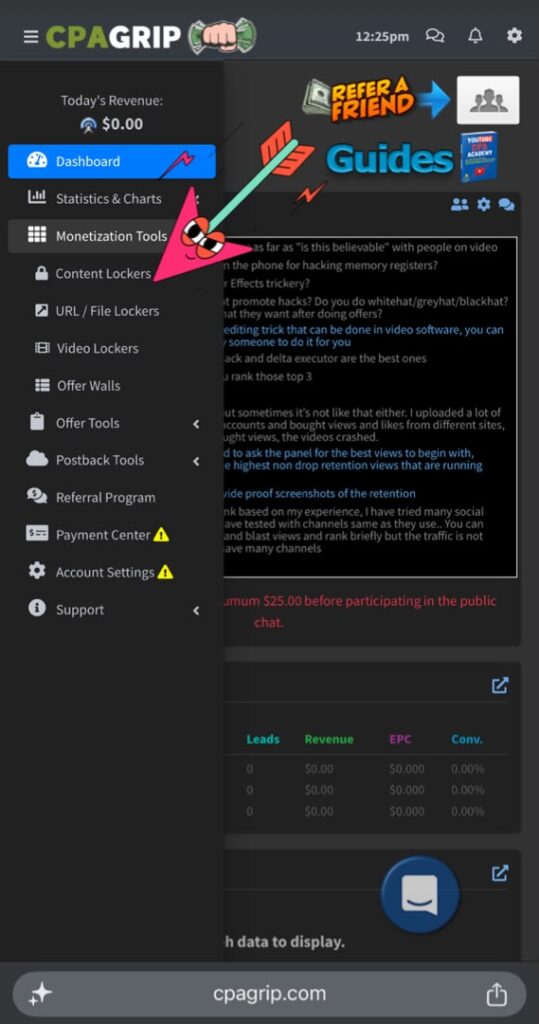
Step 3 — Click on Content Lockers
Inside Monetization Tools, select “Content Lockers.” You will land on a page showing all your existing lockers or an empty list if this is your first time.
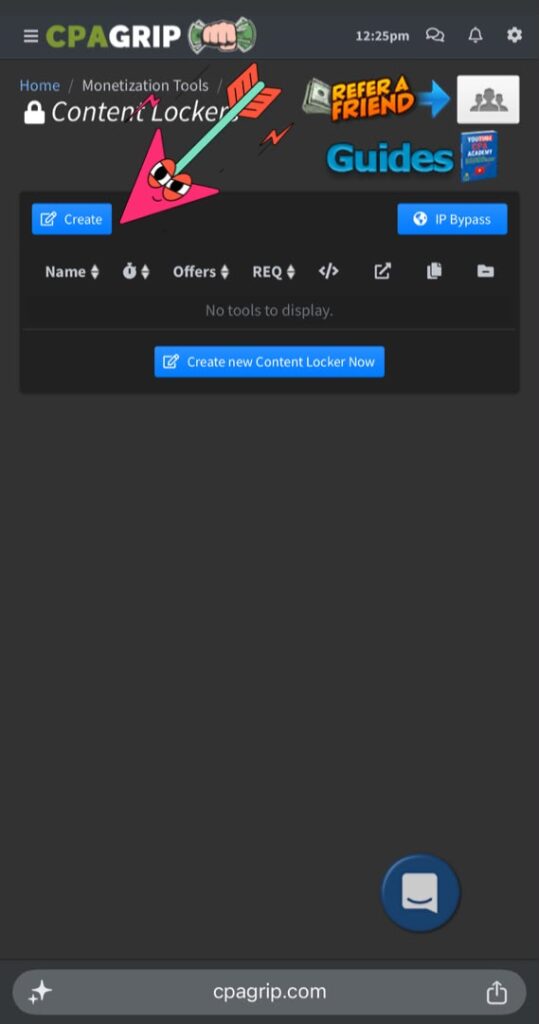
Step 4 — Create a New Locker
Click the blue “Create” button at the top left of the Content Lockers page.
Step 5 — Accept the Terms
A terms and conditions popup will appear. Read through it and accept to proceed to the locker editor.
Step 6 — Fill in the Locker Details
The locker editor will open with the following fields:
Name: Give your locker a clear name like “SmartEarnNG Free Guide Locker” so you can identify it easily later.
Header Text: This is what visitors see when the locker appears. Keep it simple and compelling. Something like:
“Complete one quick step below to unlock your free Nigerian income guide.”
Settings to configure:
- Show Offers: Set to 3 — gives visitors options to choose from
- Access Time: 24 Hours — visitor won’t see the locker again for 24 hours after completing
- Allow Close: No — this ensures visitors must complete an offer to access the content
- Load Method: On Page Load
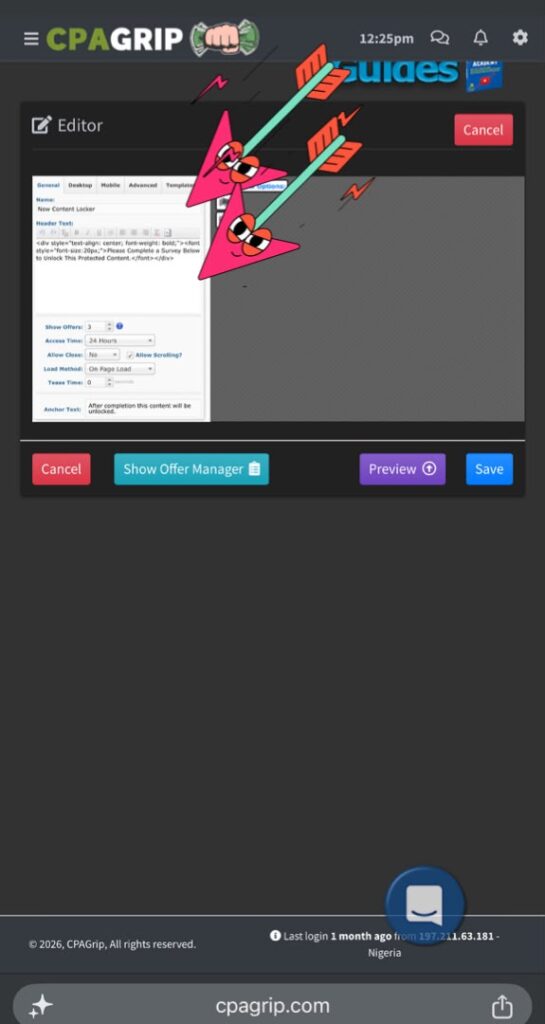
Step 7 — Open the Offer Manager
Click the “Show Offer Manager” button. This opens a list of available CPA offers filtered by country. Make sure Nigeria (NG) or your country is selected as your country filter.
You will see offers like:
- Email and zip submit offers
- Survey offers
- App download offers
CPAGrip automatically prioritizes the best performing offers for your visitors, you don’t need to manually pick specific ones unless you want to.
Step 8 — Save Your Locker
Click the “Save” button. Your locker is now created and will appear in your Content Lockers list.
NOTE: At this point you might not be able to continue with your phone if you’re using one, so best is to save and continue with a laptop.
Step 9 — Get Your Locker Code and Link
Click “Get Code” next to your locker. A popup will appear with:
- A script code to embed the locker on your website
- A direct URL you can share anywhere
For blog use, copy the direct URL from your browser address bar when you click “Preview” this is the link you will use in your articles and social media posts.
How to Use Your Content Locker Link
Now that you have your locker URL, here are the best ways to use it:
On Your Blog
Write an article offering something valuable, a free checklist, a resource list, or exclusive tips. At the end of the article, add a call to action like:
“Download our free list of 20 legitimate ways to earn online in Nigeria — Click here to unlock it free”
Link those words to your CPAGrip locker URL.
On WhatsApp and Telegram
Share your locker link directly with a curiosity-driven caption:
“I found a free resource showing Nigerians how to make their first $10 online — no investment needed. Complete one quick step to access it 👇 [your locker link]”
On TikTok
Create a short video teasing the free resource and direct viewers to the link in your bio.
How Much Can You Earn?
Each completed offer typically pays between $0.08 and $0.50 for Nigerian traffic. While this seems small, the volume potential makes it add up:
- 100 visitors complete an offer at $0.17 each = $17
- 500 visitors complete an offer at $0.17 each = $85
- 1,000 visitors complete an offer at $0.17 each = $170
The key is driving consistent traffic to your locker link, which is why pairing it with a blog and social media presence makes a significant difference.
Tips for Better Conversion
- Offer something genuinely useful — the more valuable your locked content appears, the higher the completion rate
- Keep the ask simple — tell visitors exactly what they need to do in one sentence
- Target the right audience — people already interested in making money online convert much better than random traffic
- Test different captions — small changes in how you describe the free resource can double your conversion rate
Final Thoughts
The CPAGrip Content Locker is one of the simplest ways to start earning online in Nigeria without needing a large audience or any upfront investment. Set it up once, attach it to valuable content, and it can earn for you continuously.
Ready to get started? Create your free CPAGrip publisher account here and set up your first content locker today.
Join our SmartEarnNG Telegram community for more tips, free resources and to ask questions 👉 https://t.me/smartearnblog
Have questions about content lockers or CPAGrip in general? Drop a comment below and I will be happy to help.